On Sale: GamesAssetsToolsTabletopComics
Indie game storeFree gamesFun gamesHorror games
Game developmentAssetsComics
SalesBundles
Jobs
TagsGame Engines

billiam

370
Posts
9
Topics
955
Followers
12
Following
A member registered May 29, 2015 · View creator page →

Creator of

Recent community posts

Hi,

There aren’t any shortcuts for bold/italic right now, but I’m hoping to add that in the next updat

(2 edits)

I’m at a loss.

Is there anything unusual that you can think of with your directory, drive, or permissions setup?

Does it work if using a different keybind option in Deepdwn (emacs or sublime, whichever you’re not currently using).

Can you share your settings file: %appdata%/Deepdwn/settings.json

Do you have another machine that you can test with? Does it work there?

Hmm, I’m not sure what’s going on, or why this wouldn’t be working for you.

Are you trying to link to the files in the files-deepdwn folder from a file saved to the grimdeep/0.02.00 folder, or is the file you’re linking from in the same directory as the file you’re linking to?

Does autocomplete work for images in the same directory for you?

![](my_image.png)

Hmm, I was hoping it was an issue with files or naming

Do these files appear correctly in Deepdwn?

Is the files-deepdwn directory your root directory in deepdwn, or is it one of the parent directories?

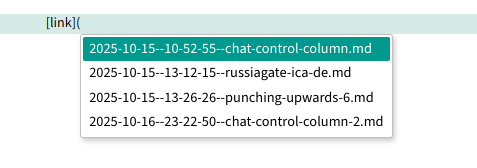
If you start a link with

[link](./

Does the autocomplete popup appear?

How about

[link](2025-

I managed to get autocomplete to work for tags.

Ok! That’s good enough for testing, and confirms that the shortcut and the popup itself are both working for you.

To confirm, what do your filenames look like?

ex:

/my-folder/document-im-editing.md
/my-folder/document-im-linking-to.md

Hmm.

Has the file that you’re editing been saved or is it a draft?

Does autocomplete work in other circumstances? (ex: after typing three backticks to autocomplete code highlighting formats).

Any errors in Deepdwn’s log files (unlikely).

(1 edit)

You can change the preview font size (which also affects exported/saved PDFs) in Preferences > Fonts > Preview Font Size.

Hope that helps!

Hi, feel free to post any questions you have to the support forum: https://itch.freezing.top/board/1147311/support

That way, other people can benefit as well :)

Thank you for your interest in helping! If I put something together, I’ll get in touch (no ETA).

Hello

Currently, Deepdwn doesn’t support (or have) any language translation/localization. Sorry about that!

Should be fixed!

Ahh! I see, thanks!

Thanks! I don’t quite understand what you’re doing when that happens. You appear to be on mobile, are you using the d-pad at the bottom? Can you tell me the steps that lead to the error?

Hi,

Custom keybinding is something I’d like to add, but there are a couple of features that make it harder to implement.

There aren’t any shortcuts to create headings currently, that’s something I’ll try to add in the next version.

(1 edit)

Thanks for the heads up. The previous version of deepdwn (0.40.2) uses an older version, which may be supported.

You should be able to install this or any older versions through the itch app. I’m not sure there’s a way to download older versions through itch’s website but I could be missing something.

I’ll see if I can get that dependency reduced in future versions.

Hello,

Thanks for your interest.

Search includes all text in markdown (and fountain) documents, but does not include plaintext (.txt etc) files. Search is also across all known files, rather than in specific folders.

Deepdwn does not implement any link-as-search functionality.

Hope that helps!

Hello!

I don’t have any plans for separate “meta” files like this, but it’s an interesting idea!

Thank you for your feedback

Sorry about that!

Yes, that’s the format I was suggesting, but I see that it’s not working in all environments. I don’t have a solution for you this minute. I’m hoping I can improve that handling in a later version.

Could you confirm that using HTML for audio players works for you?

It does, yes, but (since deepdwn isn’t reprocessing that HTML for the most part) only absolute paths to the audio file work currently.

That can probably be improved though

Hello!

Markdown doesn’t have any standardized syntax for audio or video embedding (unlike images) unfortunately.

You could use an HTML element like:

<audio controls="controls">
  <source type="audio/wav" src="/path/to/audio.wav"></source>
</audio>

And see it in the preview, but that it would depend on your needs

Cool stuff. You can request a refund through itch support, cheers.

Hello,

The file tree only lists files that Deepdwn can edit (markdown and fountain files).

There aren’t any plans to change that currently.

Can you tell me about your workflow? It’s possible that some existing features (ex: image autocomplete) may help

(User posted this on social media)

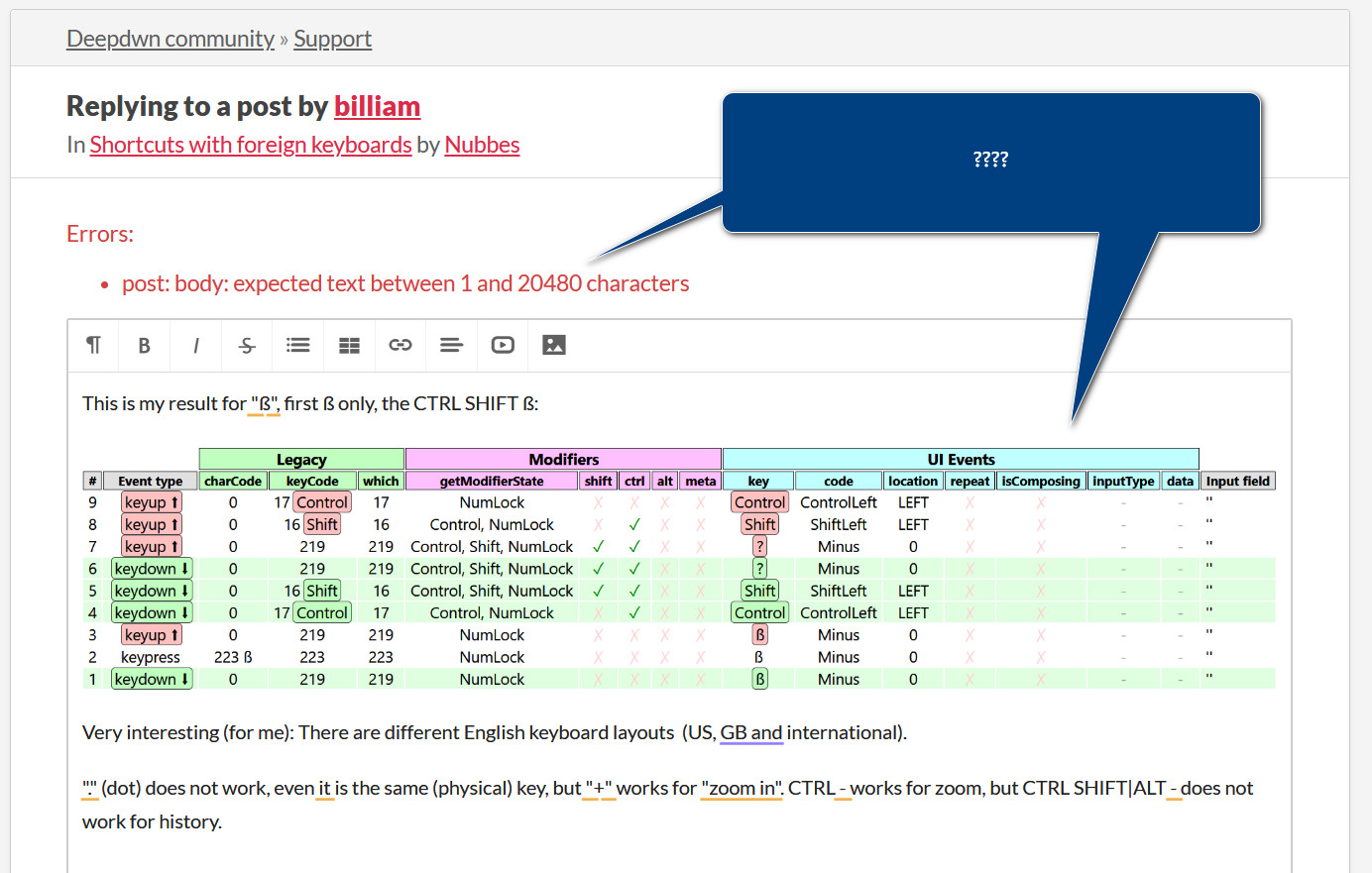
Based on that screenshot and my local testing, it seems like Ctrl Shift ß would fold the current section. Can you confirm that’s the case for you?

I don’t have a physical german keyboard to test with, so I want to make sure Deepdwn will see the correct key shortcuts for this case

Can you visit https://w3c.github.io/uievents/tools/key-event-viewer.html and enter Ctrl+Shift+ß and share a screenshot of the results?

With a virtual keyboard, mine looks like this, which may not be accurate:

Hello!

Sorry about the delay responding, as (for the first time ever) a support message was in the forum spam queue!

Looking at a common german keyboard layout, it looks like the bindings specifically for folding and unfolding the current heading would not work, since those require altgr.

Can you confirm if those are the only ones you’re having trouble with?

Currently, there are no alternate binding options but I’ll see about adding some.

While I don’t have a keyboard shortcut workaround to offer you right now, you can also toggle headings by:

  • double clicking the ### part of the heading
  • typing ... after the heading to collapse it
  • clicking the ... after the heading to expand it
  • deleting the ... after the heading to expand it
  • Ctrl-K Ctrl-0 (or Ctrl-K Ctrl-J) to expand all headings
  • Ctrl-K Ctrl-# to collapse all headings of a specific level

This highlight parsing issue should be fixed in v0.41

v0.41 should fix some of the issues mention on Fountain title pages

Very basic support for opening files directly in Deepdwn added in v0.41

Support for moving to the visual start/end of line has been added in v0.41 via Alt+Home and Alt+End shortcuts

Hi,

No, Deepdwn doesn’t have any functionality like that, being primarily focused on markdown.

As much as I’d like to see Deepdwn capable of doing everything, I don’t think those kinds of layout/ttrpg tools are a good fit for the interface or code base currently.

Sorry about that!

That’s probably what you need, but I have no experience with that device, and can’t provide any support for sequence8 there.

(1 edit)

Thanks for the feedback!

This was actually (partially) already available in the default Mac key bindings, but was missing the move-to-start-of-line option. There’s an issue with how it works currently however.

I’ll see about getting that improved as well as added to the non-mac bindings

Both good points, I’ll try to get that fixed

Thanks for your feedback.

This is a planned feature and may make it into one of the next releases

Hi, thanks for the request!

This is something I’d like to have, but I don’t have any ARM hardware to test with at all, and I don’t think it would be responsible to release a new build I’m not able to verify.

I’ll add it to the list, if that should change in the future though.

Hi, thanks for your feedback.

As you’ve found, Deepdwn wasn’t really designed for that use case. It’s something I may be able to hack in at some point, but I think it would come with a lot of caveats, and features that don’t work the same when opening ad-hoc files.

I don’t have a timeframe for adding that, and I think it’s more likely that there would be a separate, Deepdwn-lite app without folders/tags/organization etc that could be used the way that you’d like.

For your use case, if there are a handful of projects you jump between most, you can add multiple folders to Deepdwn, and edit your files for all of them there, though how well that will work for you will depend on the number and size of projects.

Hello,

The mac releases have not been signed with an apple developer certificate. I don’t have a sonoma device to test with, but:

You should be able to either: Right click (or control-click) the app in finder and choose ‘open’, and then ‘open’ in the dialog prompt

Or (as I think you’re referencing)

You can install the application through the itch.io app, which also makes it easier to update.