




I made a note about this in the docs! Will push that to the online docs soon. I really wish there was more info about the internals of what exactly is going on here, but ultimately... it's reproducible, it's fixable, and the fix is probably a good practice to follow anyway with how canvases rebuild and the nature of STM updating its mesh constantly.
KaiClavier
729
Posts
10
Topics
630
Followers
66
Following
A member registered Jul 23, 2014 · View creator page →
Creator of





Easily add game feel effects to your Unity games!
The international cat of mystery is back at it again!
Interactive Fiction
Play in browser


Recent community posts
I'm thinking it's because STM Quads use submeshes. After 1024 objects on a canvas, some optimization or whatever code is modifying verts on a Unity canvas must be running, but doesn't include submeshes. This falls in-line with what I saw with Unity's VertexHelper class when I was writing STMMaskableGraphic - I needed to create a vertex stream for every submesh used on STM, then use the data from those to fuse everything back into one mesh. I got the sense that Unity itself prefers to use a single vertex stream and ignore submeshes from this. Whenever a material change is used in STM, submeshes are used to display multiple materials with a single mesh, so you should see this with font changes, too.
Some resources I found:
https://www.reddit.com/r/unity/comments/18uwwz9/is_there_a_limit_of_only_like_10...
https://medium.com/my-games-company/how-to-optimize-uis-in-unity-slow-performanc...
In my reproduction, if I give HexContainer a canvas, STM's quad renders again. So I think it might just be a Unity limitation on how canvases with many elements are set up. (Maybe once it reaches 1024 elements, it gives up on rendering submeshes? I know Canvases do *some* type of mesh optimization since UI shaders receive verts in World Space rather than Object Space, and default Unity behaviour tends to not like submeshes as a concept (quads use submeshes to render in STM), so I wouldn't be surprised by this.)
So... I think it might be best to split up the hexes and STM on different Canvases! Seems to be a better way to structure a large scene.
OK I've been able to reproduce it!
In Unity 6, I've got a canvas with two children in descending order: HexContainer, QuadText.
HexContainer contains 1000 gameobjects which have a rectTransform and Image component each.
QuadText has a SuperTextMesh object with some text and the default clap quad on it.
The moment HexContainer has 1024 children, the quad vanishes from STM. I need just a bit more time to think about this, but I have a repro scene now so this is great.
Like it's pretty strange... it's *not* a material count issue like I suspected, the moment this condition is met, the actual geometry of the mesh changes! Trying to figure out if this is linked to submeshes... I wonder if this could *somehow* be related to a bug Unity 2019 had I was never able to solve where quads just wouldn't render on canvases in some versions? The end result is similar... Submesh Materials are still being generated, but not rendering at all so it might be something with submeshes...
Still thinking on this, just wanted to post to give an update!!
This feels pretty bespoke, I might have to look at a sample scene to solve this... So quads disappear if there are 80 hexes, regardless of position relevant to eachother...? Hm, I wonder if it could be related to masking depth... but in that situation STM *should* print a warning to the console. iirc Unity can only handle a mask depth of 7.
It could be related to generated materials, but it could also be how STM grabs it's parent canvas for rendering - maybe something is getting mixed up there I can look into on monday. Not totally sure about that since it should be using the same info for text and quads, here.
Does this still happen if you add "STMMaskableGraphic" to the gameObject? If it's already there, does it still happen if you remove it?
Is this happening with The Universal or Ultra shader? Is there a difference between the two?
Also, please try toggling "ZWrite" off if you're using the Ultra shader!
So is this not happening with, for example, a default Image component in place of your map hexes? Are you doing anything with the zBuffer or rendering order with your map hexes...? Or are they *only* composed of masks and polygon collider 2Ds...? If it's just happening with that object, it's got to be some conflicting interaction between them...
Ok, I think I know what this is... I had to change the behaviour of the <d> tag to insert a zero-width space afterwards since using <d><e=myEvent><d> just compounded on the last character. So the character spacing being set to -0.1 is basically causing double character spacing by moving those zero-width spaces.
Looks like I was accounting for that in a few places, but forgot some... should be fixed, will publish this asap!
EDIT: Update should be out, look out for v1.14.11!
Super Text Mesh community · Posted in Text Disappearing Inconsistently when Enabling/Disabling Canvas
Super Text Mesh community · Posted in Text Disappearing Inconsistently when Enabling/Disabling Canvas
Hm, I wonder if it could be...
Please try opening SuperTextMesh.cs, and replace every instance of "t.gameObject.activeInHierarchy" with "isActiveAndEnabled". It could be an inconsistency between active and enabled states, where I really should be requiring both at all times. There's a check for this related to the materials system too, but I'm not sure if it's the cause immediately.
And OK that's great to confirm it's the materials system. When the font or material is different, it's fine... Hm I did do some changes a few months back to code there that determines if two materials can be shared, I wonder if there's a value that's not being considered yet that could be causing the old material to be overridden by the new one, breaking the old text. Do you have a material that's being used on both UI and non-UI text? (This technically should be fine, but I could have messed up some values related to stencils, here:)
Try uncommenting this code that's around line 7475:
//does masking value match
//if(MaterialExists_material.uiStencilDepth != Submesh_stencilDepth)
//{
//  continue;
//}
I removed this check for stencil depth since stencil ID *should* be enough to determine the materials are different, but perhaps I over-optimized and it's actually required.
If it's neither of these, I'll keep poking around. I feel it's got to be code *like* the commented code above, some value I should be checking that I'm not.
Super Text Mesh community · Posted in Text Disappearing Inconsistently when Enabling/Disabling Canvas
Right, a few updates ago I remember changing the behaviour for enabling STM while a parent gameobject is inactive...
Are you enabling the STM component, or the entire GameObject it's on in this scenario? Or does it not make a difference between the two? Confirming this will help narrow down the issue greatly - I see some points in the code where I'm only checking for one of these. This and the fact it's happening to all STM objects makes me think it's some type of desync with the internal materials system.
Do all the effected meshes have the same font and material? Or do they have different settings? If it's only happening to a specific font, that would mean it's related the materials system for sure, which automatically makes text meshes with the same settings share internal materials.
The materials system is basically... Upon rebuilding, STM objects will create and use a cache of materials to render, not the actual material assigned in the inspector. I think toying with these created materials could also cause problems, but I'm not sure how they'd be getting edited externally here. Could there be code in your project that's somehow effecting created materials...?
For the animation event you're talking about, does this refer to a Unity animation event, or STM's drawAnims and event tags? Another guess is... if it's not forceAnimation not being enabled, it could be another variable that's being set automatically. Are you only enabling/disabling the STM object? What is being called in the animation event exactly? With autoRead disabled, I believe it would still call Rebuild() and if the mesh has a readDelay above 0, it would idle on frame 1. (I still don't think it's this but more detail is good!)
Also, what version of Unity are you using? I just remembered that Unity 2019 specifically had some issues with rendering multiple materials on a canvas which I was forced to eventually give up on after seeing it worked fine in 2018 and 2020.
Thank you so much for your patience by the way, I understand how it is to have an issue you can't really show off, so I hope this is at least making a bit of progress!
Super Text Mesh community · Posted in Text Disappearing Inconsistently when Enabling/Disabling Canvas
Hello!
Yeah, that shouldn't be happening... Hm a few things that come to mind from this scenario are...
1. Re-enabling the canvas might not be properly telling child STM objects to re-appear/re-make their meshes. Is this behaviour any different when the GameObject the canvas is on is turned on/off instead? Not sure if I already is, but need to check since this can narrow it down! (If this is the case, will look into why STM isn't updating in this scenario, but that's a quick working fix for you) I have a few ideas on how to fix this if it's the problem.
2. Inside of an animation, please enable the "forceAnimation" variable on the text, at least for the frames where it will appear/disappear. This was intended as an optimization feature for animating text, but if a parent object is being set active/inactive, I can see the text or certain animations refusing to play. You can also try disabling "autoRead" or enabling "rememberReadPosition"... Those variables are true by default so if I had to guess, it's probably trying to read but refusing to automatically animate during the animation triggering it.
So, please give those a shot! setting the canvas's gameobject active/inactive, and enabling "force animation" on STM.
Does using a unity Grid Layout and multiple STM object complicate positioning too much? That would be fine for text that's spaced evenly, but I think I've seen a modified grid layout component somewhere that can use the size of what's inside for each row/column. (Together with contentsizefitter & STM that might be a solution)
Anyway, simpler second idea I have: indents and carriage returns!
A string like this will work:
"Damage:<indent=5><u=000D>A</indent>
Defense:<indent=5><u=000D>B</indent>
Complexity:<indent=5><u=000D>Moderate</indent>"
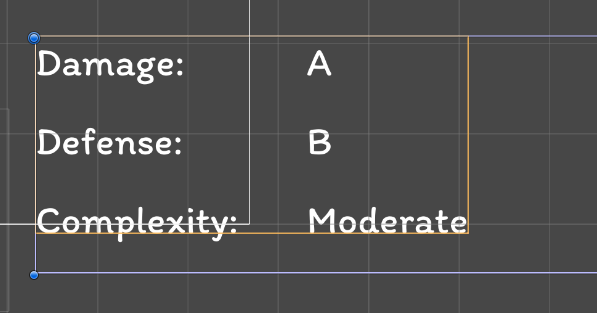
...with "5" being the width between columns (will need to be bigger for bigger text, etc), and <u=000D> being equivalent to "/r", the carriage return, which goes back to the start of a line without dropping down. (and setting the indent changes where the start of the line is)
I hope this helps!
Super Text Mesh community · Posted in Trying to get an outline working on a custom font in Unity 6000.1.6f
Hm, STM has its own system to combine materials, but on the Ultra shader, at least for now, proper batching is disabled due to how it breaks vert indices for outline and dropshadow effects. (Will experiment with replacing this with index data stored on a UV channel at some point, I think there might be one UV channel free *maybe* so that would possibly allow batching if changed) If you're not using the super smooth outlines, you could try the default Universal shader instead? It's more lightweight compared to the Ultra one too, especially since I wasn't able to complete the optimization pass on the Ultra shader I tried earlier this year. (More on how to still get the outline effect with this soon...)
The material combiner system reduces draw calls if two meshes share the same basic text settings. So same font, same material, etc. Effects like basic color tags do not matter, as those are applied with vertex colour, but the"texture" color tag will make a new material. From your last screenshot, this seems to be the case already, though... So I'm not entirely sure why each component is causing a new draw call. A culling script is a great idea though regardless! (You can also try disabling the STM component but leaving the meshrenderer & meshfilter on, that could potentially give a performance boost, but I have not tested this)
STMMaskableGraphic may help, all it does is let STM behave as a "MaskableGraphic" component properly, so that could be the cause of the Z issue here, potentially. I'm not sure what would have made it not work a month ago, so it's worth another shot! That should hopefully enforce some rendering order features. Additionally!!With STMMaskableGraphic, you can use a basic shader like the default Universal one, and then use Unity's "outline" component to render an outline that way. I also did work with LeTai's assets to get their asset "True Shadow" working together with STM, which can produce a batched, smooth outline if configured properly. https://assetstore.unity.com/packages/tools/gui/true-shadow-ui-soft-shadow-and-g...
Another small thing to try is, is anything different if you nudge the text forwards a bit? There could just be an issue with the Z buffer somewhere, so if the text and background are on the same layer, I could imagine it getting scrambled together with VR rendering, somehow. (The text is *supposed* to push itself forward a bit with effects like this, but I can see VR as being an edge-case I didn't account for. There's a manual "ZDepth" value in the Ultra shader that might give a better result if adjusted, I can send shader variants soon but I think the Universal shader should be tried first)
If you can let STM do most of the work, see if that works for you! The AutoWrap feature sounds like what you're after, with VerticalLimit being its vertical counterpart. (On UI text, these values are controlled by the size of the recttransform, by the way!!! Unless"ui wrap" and "ui limit" are disabled.)
The STMMatchRect code in my sample scenes really sounds like what you're looking for - it just takes an existing rectTransform which you can change the appearance of, and resizes it based on text size. (With options for which bounds it's copying.) So please check out the sample scene for that.
What is your monitor's refresh rate? If it's higher than 60, that means the issue shouldn't be something delta-related, so that helps narrow it down at least. (Thinking it's happening on a per-frame basis, rather than a per-time basis)
Got your zip, will check it out shortly!
Layout issues like that can even stump experts, so it's a bit tough to debug this all without doing it myself... sorry for that!
For the MatchRect script, to be a bit more clear about how it works... Place it on the object you want to resize to match the text's bounds (so in your case, the background) and then in the inspector, you need to drag in the gameObject that has SuperTextMesh on it from the hierarchy into the "stm" field. (Ideally the objects are siblings in this case).
But it sounds like Adventure creator may be trying to resize the box itself, so this might be the wrong approach... (Sorry it's been a very long time since I've had AC's code in front of me, so I need to guess... If AC is trying to set the box size itself, you need to remove the ContentSizeFitter from STM, and set the anchor presets on its recttransform to stretch. (So it'll match whatever AC is actually resizing) So in this instance, instead of the text controlling the box size, the text is fitting in the box size. Not entirely sure this is the case here though.
I'm actually not too sure what to make of that maybe useful info immediately... does it *only* happen when recording? Could the STM object have anything else on it causing an issue in this instance?
For the script I sent, forget about it for now because it was incomplete and I wanted to expand on it, I don't think it would have changed much in its current state. I also think the MatchRect script might be a more direct fix for this issue. But yes, it has public fields, one for an STM component, and one for a LayoutElement... it's meant to send values generated by STM straight to the LayoutElement, which could be a parent object in your case. It's C# code, by the way!
If I'm not able to solve it like this, I might ask you to sent over a scene for me to edit, I feel like it might just be one thing out of place, and the fastest way to know is by just pushing all the buttons, haha. I'd really like to isolate the issue because it's still not completely clear if it's an issue with STM, AC, or Unity Layouts!
Yeah, I think the problem may be that it's two content size fitters immediately inside of one another (but I'd expect this to effect size, not position... so might be the wrong path to look down?) ...without a layout group or layoutelement to help decide what controls what.
The way the code I sent works is... you reference an STM component, then you reference a LayoutElement component, and the height value from STM is sent directly to the layoutElement's "preferredHeight" field. (Make sure preferred height is enabled on the layoutelement or this does nothing) The LayoutElement is intended to be the parent object of the one STM is on, in this example. I'm catching this before bed, could add the other fields besides height for you tomorrow.
Hm, you said before that TextBoxContainer also has a vertical layout group already, but it *might* work here with using a layoutelement and setting values directly from the child STM object. I'm still not completely convinced this is the error though since it's *always* just returning to the same point before being corrected what I can assume is a layout refresh... so even if we fix the layout refresh, something could still be responsible for the move.
It might also be worth seeing if reducing nesting would help - could txtSubtitles be made a sibling of Panel_TextBG instead of a child? If you go into STM's sample scenes, there's a "MatchRect" script that will let one rectTransform fit to STM with various settings, regardless of parenting. I forgot to mention this before, this is probably a more direct and thorough fix than piggybacking off LayoutElement... probably!
So please give that last one a shot! That might be better since you're trying to size a box based on text size, anyway!
Here's the code, it's quite basic and only copies over one value to the LayoutElement, but could be modified to nab other values, too: https://pastebin.com/XbvqHeCC (I don't want to do it myself because it's the long weekend - maybe tuesday!)
Can the TMP object be moved elsewhere? Curious if it's controlling position at all.
Will think more on this over the weekend, but I'd really just like to figure out... what is trying to make this move back to the origin anyway? Could it be a setting for subtitle location in AC or something...?
Hi! I saw your post with John, let's see what's changed in the last 9 years... (A lot has changed with how Unity UI handles layouts as well)
Immediately seeing, the fading animation starts and then continues as the position corrects itself...
Assuming this is Unity UI...
1) Try replacing "supertext.Text" with "supertext._text", this is something that I think might have changed in the last 9 years, but I'm not completely sure if it's the issue here. ("Text" I believe used to update text WITHOUT calling Rebuild(), while "text" would, but now "_text" has this function, so the issue could be that Rebuild() is being called twice here and some layout code is getting confused)
2) Try replacing "supertext.RegularRead()" with "supertext.Rebuild(true)", which I think should have the same effect, guaranteeing STM will both rebuild and read at the same time.
3) Try adding supertext.rt.ForceUpdateRectTransforms() after the "RegularRead()" line is called. (Assuming this is on Unity UI) That might force the layout to rebuild if it's a layout issue. You can also try "LayoutRebuilder.ForceRebuildLayoutImmediate()".
4) I'm also guessing at this but... does your STM object have a ContentSizeFitter on it? I've been running into some problems with nested layouts and contentsizefitter in just the last few days actually and wrote myself a rudimentary script to make sure the effects of ContentSizeFitter happen frame 1 with STM, rather than waiting for the layout update. (It just forwards information to a LayoutElement component) So I could try sending over a cleaned up version of the script with this, but with any luck it's one of the first 3 issues.
These are my initial guesses! There's nothing in that code that should be effecting text position besides those 3 things there, so there's a chance it's how AC works now... I can take some guesses at how *that* might work, but I don't use it myself! (I could ask the dev, but I'll try guessing first...)
5) What is the parent object of your STM object? Is it also moving when the text moves? What is making it move? (Thinking maybe AC is trying to use the position of the hidden text object to decide where STM should go, but not sure how it would play initially then decide to move after a few frames...)
Let me know if any of these help!
Super Text Mesh community · Posted in Trying to get an outline working on a custom font in Unity 6000.1.6f
Ok those screenshots and description help a lot! Here's some things to try:
In the inspector try disabling ZWrite. This is basically there just to make it so Ultra shader outlines don't go over the previous letter, but if your outlines are thin enough you may as well disable it, it can *sometimes* cause something like this to happen if text is is a 3D space like this, rather than being on a UI. I feel like this shouldn't be happening with ZWrite on though, so if this solves it I'll look into how to prevent it from being a problem in the first place.
I'd also check out the rendering order of those objects in the background, is their render queue above 3000? You can try changing the render queue value on STM's material settings to something higher!
Do you get a result similar to what you want when using the Universal shader (plain version with out outline) then adding an outline through STMMaskableGraphic? That's also an option for rendering outline effects now, too!
Super Text Mesh community · Posted in Trying to get an outline working on a custom font in Unity 6000.1.6f
Ah got it, so yes for the Universal shader there, that is just what it does and why I made the Ultra shader. (But apparently it works fine in builds?)
Do you have any screenshots of the weird artifacts in the Ultra shader? It sounds like... hm, the material/font is changing, but the UVs don't update to match immediately which they really should. Saving *should* usually correct that, but that's odd... if an error showed up that got cleared (an error I would like to fix btw), STM might have entered a stalled state. If you select the object in the hierarchy and press ctrl+d to duplicate it, does anything change on the new object created?
Super Text Mesh community · Posted in Trying to get an outline working on a custom font in Unity 6000.1.6f
Hey!
Are you sure this is the Ultra shader? Normally the UI on the inspector there should change when it's been applied, and in your screenshot it's showing the configuration for the Universal shaders. (Additionally, the rendering going on here is what I would expect the Universal shader to do in this circumstance, where it's only rendering the final pass of the outline and ignoring the text pass) So please try clicking the "Ultra" button next to the shadier field on the inspector to apply that shader to your material. Please let me know if that makes a difference.
If nothing changes when pressing that button and you don't get any errors in the console, try saving your scene as that will force STM to rebuild the material settings.
Unclosed tags will not lead to any issues with how STM currently works, and if I were to add this tag stacking change I would also not require tag closing! As it stands, when text parses, it just goes forwards, not backwards.
(There's some benefits to the current system by the way... color tags of a different type can stack (color, gradient, texture) but now that I've got the combo color tag (<c=myColor,MyGradient,myTexture) and customizable color-mixing rules for color data, adding an alternate tag parsing system could be interesting...)
Well, with the current way it works, the closing tag means that *any* closing tag (not just fonts) will return to the default setting for that tag, which has its own uses! (But there is the <clear> tag already for clearing everything to default I suppose...) I guess I think of them more like programming the text as it's read out, rather than formatting existing text? I think I wrote a bit about this system int he docs, but I could make it a bit clearer. Anyway, should all still be workable!
Hey!
This is the current intended behaviour, a new tag will always override the state of an old one, so you'd want "<f=baseFont>1<f=newFont>2<f=baseFont>3" for this. I could add this as alternate behaviour in a future update maybe? I feel there was some reason I was avoiding it (I suppose it was because I didn't like the idea of needing closing tags, but I could still make that optional...? Or that this system technically runs faster since I never need to check which tag is closing, just override it with a null value), but with recent backend updates, it might not be that bad to add in now.
Hm, right I think I might see the behaviour that's happening... if I have the rectTransform set to something *taller* than the text, then when it's on one of those best bit modes, it will try to fit the height, not just the width. You could try setting the text's rectTransform to exactly the height you need (either manually or with a contentSizeFitter) and then using another transform to parent that, but I should probably add a setting sometime to control which axes are being considered for best fit. Or I could just... add a maxSize field for this already, augh. Don't know why I didn't just add one before (I think vertical space was not considered for best fit in the past), but I'll add it to the list of things to do! I hope the workaround is an OK immediate fix, though!
Hello!
1. This isn't TMP, so I've got my own approach to text size... The best fit system (Apart from Multiline - more on that later) was meant for text with manual linebreaks only, like small UI elements. So the other options on the "best fit" enum control how the text acts - Always will resize text to always fit in the area, SquishAlways does the same but only on the X axis. OverLimit will only make text smaller if it goes over the bounds of the box, and SquishOverLimit does the same but only on the X axis. I believe this look for limits both horizontally *and* vertically, but it's mostly made for fitting in a horizontal area.
So for these, minSize just makes it so text can't shrink down forever, and "size" effectively works as your maximum size, since that is the goal size for the text. I'm not sure how you'd be getting a random huge font size with this, though...? (Could be related to multiline...) Aside from that, I'm not sure what the problem is with my approach to text sizing?
2. This is probably because of the "multilineBETA" best fit mode you have assigned. If your option there has just one line - please use another best fit mode! I left the "BETA" tag on there because I wasn't satisfied with it - there are alignment issues with different anchor settings, and it just wasn't the result I wanted for automatically resizing text that still had automatic linebreaks. You *might* get a better automatic alignment with it if you set it to top left anchor/alignment and parent that inside another object, but if you're only doing one line of text like in the above screenshots - don't use this best fit option! You'll have much better control over how big you actually want text to appear on-screen.
Oh sorry I had a bit of a misunderstanding here, I thought you were talking about switching materials mid-string specifically.
The intended way to change materials at runtime is... set superTextMesh.textMaterial like that, and then call Rebuild() or update .text. (At runtime, STM makes internal copies of materials so multiple meshes can share, which is why updating the field in the inspector doesn't seem to work then until something forces Rebuild()) But good point, I could just make ApplyMaterials be public for this use-case where *only* material is changing and not text. I don't think there's a harm in changing that...?
Honestly I could probably implement an <outlineColor> tag that does exactly the code you just showed me since STM creates copies at runtime. I haven't done this yet because the material would have to have a compatible shader from the get-go (Ultra or Universal Outline variant) and the material caching system right now just checks if the entire material matches... so if two different meshes had runtime materials with red outlines but otherwise the same properties, they wouldn't be counted as the same material at the moment, and they might get confused with the base material too. That said, I might try to add this and worry about optimization later, it sounds useful to have! But at this moment, the suggested way is to make different materials with different outline colours before the fact. So I think creating it on Start like that is fine for now!
So... I think what you're doing there is completely fine to do! If you're not also updating text together with changing the textMaterial, I'll expose ApplyMaterials() in the next update, and also start looking into outlineColor tags so code wouldn't have to be written for this. (I've also thought of making it so the outlineColor and other properties are linked to STM rather than the applied material, but it introduces a few more downsides than upsides, so I just left it as-is.)
So to sum it up... using tags to switch pre-made materials or just assigning a pre-made material and making text rebuild will only be more efficient than creating and assigning a new material at runtime if more than 1 mesh is displaying your modified material, by saving draw calls.
Hello,
At the moment, changing materials is the correct way to set outline color with code, and that was working the last time I checked... but maybe it's possible I missed something with serialization on an update.
Does your text look anything like "<m=blackOutline>Hello, <m=redOutline>world!"? The tags should be case-sensitive.
One thing that might be happening is... if you are creating the material tags through Unity's project window instead of STM's Text Data Editor, you'll have to click "Refresh Database" at the bottom of the Text Data Editor for STM to become properly aware that the material exists. (I should probably put a note on the inspector about this or change how this works to not be required at this point...)
Ok, glad to hear! Also I'm curious, was the render order set to 3000 by default? It should be, but I could swear once or twice it got set to 2000 without me doing anything. Most likely some other script I was editing at the time, but let me know if that has happened to you! (3000 is the default order for transparent objects, 2000 is the default order for opaque)
Just in case, will link this page on default renderqueue values!
Here are some thoughts:
1. Can you change the render queue for STM and your glass shader for this situation?
2. Is a rendertexture acceptable for this? e.g. point a camera at an STM object, output rendertexture to surface?
Besides that, I do wonder if I could modify the output to go directly to a texture... it would be a pretty big rework though and not technically a mesh anymore, but I do like the potential of this, even if it's just skipping the rendertexture step. Not sure if I could get it running any more eddicient than that does anyhow off the top of my head! (on the fly texture creation vs. extra camera in scene)
Thank you for your patience with me, will send Unity something soon - because yeah it is quite odd that other text renderers aren't having this issue, while it's been a reported issue for other custom inspectors for at least 5 years... Not sure if it's an internal code thing or something I'm just not understanding. So thank you very much for the kind words!
Right, that's another valid way to implement tags.
There's the <indent=x> tag, but it just uses a non-relative value like the <size=x> tag. I could add an <indentRelative=x> tag (probably with a shorter name) for that, or if you're already adding custom tags, you can modify the code to multiply by size.
Another option would be making an empty quad (with a full transparency texture), which would scale up and down with text naturally, and let you control the indent size from the width of the quad. So... that's an existing tag that would let you do this!
Does this information help?
Ok cool, glad you have a working solution! Once again, sorry for the performance issues, but I still have not been able to come up with any other workarounds - will keep my eyes open though.
Good point, the custom text tags in STM refer to the tags like <w=MyCustomWave>, so maybe I should redo the language on this... I've got two solutions already though:
1. Use the voices tag (<v=myVoice>) which just inserts a pre-made string configured in the text data editor, which can contain other tags. So... "<v=h1>" could become "<s=1.2><b>" if set up this way.
2. If you look at the "Links" example scene, I have a more thorough example of a truly custom tag. It uses STM's preparse event to inject a custom tag with regex. It takes a string like "<link=Label>" and turns it into <e2=link,label> which is then further sent to the custom event system. So, turning this into a string replacement script for your purpose would be easy! "<h1>" can turn into "<s=1.2><b>".
That said, lists will be a bit more work. STM's formatting may look like HTML, but it is not HTML. There isn't an internal numbering system for lists or anything like that, it's just a renderer. I'd personally just write stuff by hand, but you could write a custom tag in this way that would do the following:
*Find the start and end tags' position ("<ol>" and either "</ol>" or the end of the string)
*Run replacement code for all text between these tags, so after every linebreak, insert a string for the numbering system. (eg 1. 2. 3.) There should be a special situation to also insert on the first index if the tag is not followed by a linebreak, and to NOT insert on the final linebreak if the tag immediately follows it.
*Remove original tags. also make sure to update the indices as the sting updates.
I am not running TMP under the hood, this is a different asset that began development before TMP was purchased by Unity. I hope this info helps!
OK, I managed to clean up my preset scripts with a custom inspector!
STMPresetController https://pastebin.com/pZymy31R
STMPreset https://pastebin.com/9mXe2emT
Add STMPresetController to whatever gameObject has STM on it and you want to control with a preset. There's a "NEW" button that will create a new preset based on the settings of the STM object.
Once a preset is assigned, "Copy Super Text Mesh to Preset" will re-apply settings to the preset as if it was newly created, "Paste Preset to Super Text Mesh" will take the settings on the preset and send that to the attached STM object, and "Paste Preset to ALL" will do the same but to every STM object in the scene. I was going to make this automatic, but it's just an editor tool so it would be impossible to run on presets not open until they're open... So I *could* have it run during runtime OnEnable(), but for now it's just there to apply multiple settings at once.
So... if you had two Preset Controllers in a scene, changed the settings on one and pressed "Paste Preset to ALL", the changed settings will apply to all STM objects with the same STMPreset assigned to them.
The settings are limited to Font, Size, Quality, Filter Mode, Line Spacing, Material, and an option for Base Offset at the moment since those are what I think is most relevant to this, but it could be expanded later.