On Sale: GamesAssetsToolsTabletopComics
Indie game storeFree gamesFun gamesHorror games
Game developmentAssetsComics
SalesBundles
Jobs
TagsGame Engines

Spooky Squid Games

70
Posts
6
Topics
714
Followers
46
Following
A member registered Aug 15, 2016 · View creator page →

Creator of
Recent community posts

Thanks. Unfortunate if that's the case. It's only a minor inconvenience at least!

Any update on this feature? I just ran into this issue after sending a client a mistimed gif due to the timing defaulting to 100ms.
Until it's added it would be great to have a clear warning about this limitation in the export window since it's easy to miss. 

Thanks! 

I've noticed that when I have more than one sprite file open, the focus leaves my current file, and switches to the next one after I export using Advance Exports. 

Update: I figured it out! It seems to be some sort of conflict with another export extension I sometimes use GMLink
https://pr0te.itch.io/gm-link

Disabling GMLink and restarting Aseprite fixed it, still no permissions pop up, but I guess the old permission I set ages ago maybe worked once GMLink wasn't running? 

Turning GMLink back on causes the error to re-appear so looks like that's definitely the culprit. 

Thanks for the quick attempted fix! Gave it try and it asked me to upgrade from 5.4 to 5.5 as expected, but still didn't request permissions. I still get the error when I try to export using it. 

Wish I knew where it stored the permissions, I imagine there's just one line in a file somewhere that needs to be erased or something. 

(2 edits)

Sure. Here's the pop up. 


(1 edit)

Hi I'm running into the same issue described here:
https://itch.freezing.top/t/4428696/solved-sprite-doc-error

The problem is, there doesn't seem to be a way to trigger the permissions dialogue when I run CF Advanced Exports from the file menu. It just pops up the "attempt to call a nil value (global 'Sprite')" error. 

I'm guessing something funky is going on with my script/extension permissions for Advance Export, due to having installed an older version of Advanced Exports in the past, but I can't figure out how to fix it so that the permissions dialogue appears. The usual tricks like Uninstalling and reinstalling Advanced Exports, or restarting aseprite, do nothing. 

Any tips on how to get permissions sorted out?

A quick tip for setting things up so you don't need to change your over all monitor refresh rate to 60hz, and can just have it automatically change when playing They Bleed Pixels (or any other older game with this issue). 

https://itch.freezing.top/post/5642905

Hope that's helpful! 

Thanks for letting me know! Yeah this seems to be combination of the newer Xbox controllers being a bit weird and a Mac thing. I've made a note of it though! 

Please try replacing the file I mention in this recent post. 
https://itch.freezing.top/post/12444692

If you could let me know if that works for you and what generation of Xbox controller you're using that would be really helpful. 

Hope that fixes the issue for you! 

PS4 controllers should auto detect, and will display PlayStation buttons so long as you don't use any sort of gamepad tool like DS4Windows which will confuse the OS about what type of gamepad is attached.

PS5 controllers were released after the latest update to the game so it won't automatically detect them, however you can add support by replacing the file gamecontrollerdb.txt file in the game's directory with the latest one found here: https://github.com/mdqinc/SDL_GameControllerDB/blob/master/gamecontrollerdb.txt

It'll work but will be detected as a generic controller so will only display Xbox buttons unfortunately. 

Hope that helps! 

Weirdly (long story) it was created twice, first in XNA and then in a C / SDL based custom engine which is the current version. 

Yep Itch supports  custom "collections", so it's easy to group the stuff you're actually interested in and find it again without looking through every possible game you own. Someone has also made this great site for browsing the content of any itch bundles you may own.  https://randombundlegame.com/

Yep the California Fire Relief bundle is real! 

Thanks for the bug reports! If you have a chance could you post a screenshot of your monitor displaying the tutorial... or is it literally a blank screen?

If unplugging those various other controllers fixed the issue you can probably plug them back in and set the CONTROLLER_INDEX to the right number, sounds like it's probably somewhere in the 1-4 range.

Regarding the speed on the monitor. I'd recommending going into the monitor or graphics settings for your graphics card and set They Bleed Pixels to use 60 fps/hz while keeping vysnc enabled. Disabling vsync by itself may still result in some speed issues unfortunately. This is a known issue with high refresh rate monitors that is unfortunately very difficult to fix in game now, but thankfully easy to work around. 

Odd, I'm pretty sure both of those should work, especially the 360. But Linux can sometimes be a bit weird around this stuff. 

Here are some troubleshooting tricks that might help track down the issue. 

  • Try using the controllers wired.
  • Try turning off Steam Input, it can sometimes cause interference. When running the itch version try turning off Steam entirely. 
  • If there are any input devices beyond your mouse, keyboard and gamepad try unplugging them before running the game. I've come across a few instances in Linux where another device was registering as a gamepad, messing up controller assignment. 
  • Related to that, you can manually change the controller 'slot' by editing the config.txt file found with the game files. Look for  "CONTROLLER_INDEX = 0" and increase the number to "1", "2", "3" etc, relaunch the game each time after saving the txt file. Just be sure to set it back to "0" after if you don't find a number that fixes it.
  • Make sure you have all the usual linux gamepad drivers installed, since it's possible the other game's are relying on some other way to access the gamepad. If nothing else fixes the issue, it's worth goig through the various driver installation instructions listed in the article I posted before, just in case that's the cause.

Let me know if any of that helps. If not could you tell me some basic info about your setup? Eg. Is this a desktop, laptop or handheld device? What version of Linux are you running? Anything else unique or weird about your setup?

Thanks! 

Sorry to hear that. Could you tell me what controllers you've tried? Do the controllers work for other games on that system for you? 

This guide has some tips in case it's some form of driver or missing library issue
https://www.makeuseof.com/tag/get-game-controllers-running-linux/

Just sent an email with a bunch of files that'll hopefully help track this down.  Totally understand that it may take awhile to get a fix in. Hope the game launch is going well! 

I really can't figure out what would be different. I've had a bunch of theories. Name length, texture groups, the color of the slice, but nothing has proven to consistently make a difference. But conversely it's also not pure random chance every export. Consistently, editing some sprites in my aseprite file trigger it and editing others don't. 

One thing that makes it a bit harder to test is that from what I can tell, once the error is triggered once, it won't trigger again till I reload the project and do a new import. 

If you haven't been testing the Long Term Stable (LTS) branches of GameMaker my hunch is that this error is to be expected as the LTS and regular GameMaker branches have diverged over time, and the weird anomaly is actually that I'm sometimes not getting this error message.

Just FYI LTS 2022.0.3 is the latest LTS version, released in November. The LTS version release numbers don't match the current year the way the regular GameMaker version numbers do https://gamemaker.io/en/blog/version-lts-r3
---

Some further investigating. I just tested exporting a sprite that gets the error, and one that does not, with my project closed so that I can see exactly what GM Link is exporting before GameMaker throws the error and attempts to fix it. Checking Github desktops diff display for the sprite_name.yy files. What I've found:

The order that elements are listed is different making it difficult to tell if the exact same info is in both the old and new files. Eg. ""resourceType": "GMSprite"," is at line 2 in the old file and line 30 of the new one. 

New file is two lines longer, but I can't figure out what exactly was added.

I can find some minor but probably important differences Eg. "resourceType":"GMSpriteFramesTrack" was changed to "$GMSpriteFramesTrack":""

Looking at the the yy file for the sprite that throws an error vs the one that doesn't, both have all the changes listed above, but the one that doesn't throw an error, inexplicably uses the earlier resource version numbers! So yeah the actual mystery here is why it doesn't always use the newer version numbers and throw the error since it's clearly sending stuff in the newer format  in both cases.

Once I loaded GameMaker it went into both these yy files and cleaned them up so that the only changes are the various name and ID blocks. So just the stuff with long hex strings like: "b0cb57fe-e71b-4013-bdd3-37565da5b115"

So GameMaker does seem to be handling converting the files back to the LTS standard. It's still a bit worrying though. I generally think of the yy files as dark magic, so any time something strange happens involving them I get nervous. 

Let me know if it would be useful to have these various yy files for comparison. It would be great if GM Link had the option to export LTS compliant files in the future, but I realize that may be too big of an ask! 

(1 edit)

I've been using GM Link for a few days with no issue. Then had the following error warnings (pasted below) when importing a few new sprites. The aseprite file and GameMaker project were the same I'd be using previously. Just added two new sprites. Nothing fancy or different than before. 

I'm running GameMaker LTS IDEv2022.03.85 which should be the latest LTS.

GMSpriteFrame Resource version is newer than supported version in CoreResources: 2.0 > 1.1
GMSpriteFramesTrack Resource version is newer than supported version in CoreResources: 2.0 > 1.0
KeyframeStore<SpriteFrameKeyframe> Resource version is newer than supported version in CoreResources: 2.0 > 1.0
Keyframe<SpriteFrameKeyframe> Resource version is newer than supported version in CoreResources: 2.0 > 1.0
SpriteFrameKeyframe Resource version is newer than supported version in CoreResources: 2.0 > 1.0
GMSpriteFrame Resource version is newer than supported version in CoreResources: 2.0 > 1.1
GMSpriteFramesTrack Resource version is newer than supported version in CoreResources: 2.0 > 1.0
KeyframeStore<SpriteFrameKeyframe> Resource version is newer than supported version in CoreResources: 2.0 > 1.0
Keyframe<SpriteFrameKeyframe> Resource version is newer than supported version in CoreResources: 2.0 > 1.0
SpriteFrameKeyframe Resource version is newer than supported version in CoreResources: 2.0 > 1.0

Sprites seem to be fine, imported as expected but I'm worried something might be messed up in the asset definition files somewhere deep in my project now. 

One clue,  I did open the details on a few slices in asprite and changed the color for them so they'd be more visible against the grid. I'm guessing that maybe triggered your 9-slice bounding box code or another advanced feature which I guess isn't fully compatible with LTS? 

None of my aseprite slices have 9-slice or pivot turned on, could just changing the color on a slice be enough to change how they export?

UPDATE:

I've run a bunch of tests reverting both my aseprite and gamemaker project each time and restarting gamemaker and it's baffling. Even if I don't add any new sprites, just editing the pixels (touching nothing else) for some sprites triggers the error when I update while others are fine. 

Also tried a brand new aseprite file and also got the error when just exporting a single slice. A real mystery what's causing this. 

I have no idea in terms of what sort of embedded kerning info is embedded in the font.  But the issue with the spacing around the letter "I" appears consistently in a variety of software, so there's something wrong going on with the font.

Just gave it a test run and it worked great! Spit out all the right files with correct names. Thanks a lot! 

(6 edits)

Basically I want it to do the same thing that the built in PNG export in Aseprite does.
Eg. if I have a aseprite file with multiple animation frames, select "Export As" and set my output file to a png, it pops up this message when I export:
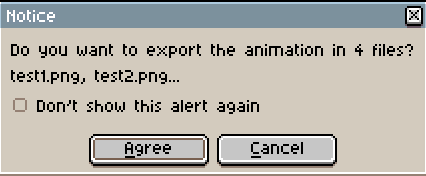

If I click agree it'll export each frame with the frame number appended at the end of the file. If I add padding to my file name eg test001.png it'll include the padding in the export 001, 002, 003. etc When exporting animation tags it'll export using numbers starting from 1 (eg  if a tag starts at frame 5 it will still number the first frame of the tag as 01 not 05). You can also set the start frame number if you name your base file 00 vs 01 etc.

See also the documentation for "Export as a sequence of images" https://www.aseprite.org/docs/exporting/

Along with sprite sheets, image sequences have been a pretty standard import/export option for pixel art animation software, which is why I  was surprised it didn't work when I tried.

Re your suggestion "To do that you would have to create an animation tag for each frame" this wouldn't solve the issue as I'd lose the tag names for each animation  when exporting (eg. walk, attack, fall etc.) and would need to add/edit new tags every time I added or moved a frame. It kind of defeats the advantage of having a fancy bulk exporter. It also wouldn't allow me to loop or playback individually tagged animations inside aseprite while working on them. 

Is there any chance that image sequence support can be added to Aseprite Advance Export's roadmap? That and saved export settings are the two things blocking me from adding this into my regular workflow.  Thanks! 

(1 edit)

I can't seem to figure out how to export png sequences with this tool.  Even using the example files it only creates a file for the first frame of each animation tag.

Eg. instead of producing: 
Jump - Blobs - Set 5 - 00.png
Jump - Blobs - Set 5 - 01.png
Jump - Blobs - Set 5 - 02.png
Jump - Blobs - Set 5 - 03.png

It just produces the first frame:
Jump - Blobs - Set 5.png

Is this feature not supported or is there some trick to getting it to do png sequences? 

Also is there any way to save or repeat a specific set of export settings? 

Thanks! 

Glad you're enjoying it! If you purchased the game on it's own (not in a bundle) you should have access to a Steam key.

I'm getting very weird vertical alignment when using Silver in GameMaker.  Attaching an image showing three single line strings all drawn in the same spot (the red dot) with different valign settings. The vertical alignment differences are so extreme that it appears as though they are on entirely different lines. 

My guess is something is wrong with the internal font formatting in Silver that's causing this since it doesn't happen with other fonts (at least nothing this extreme!).  
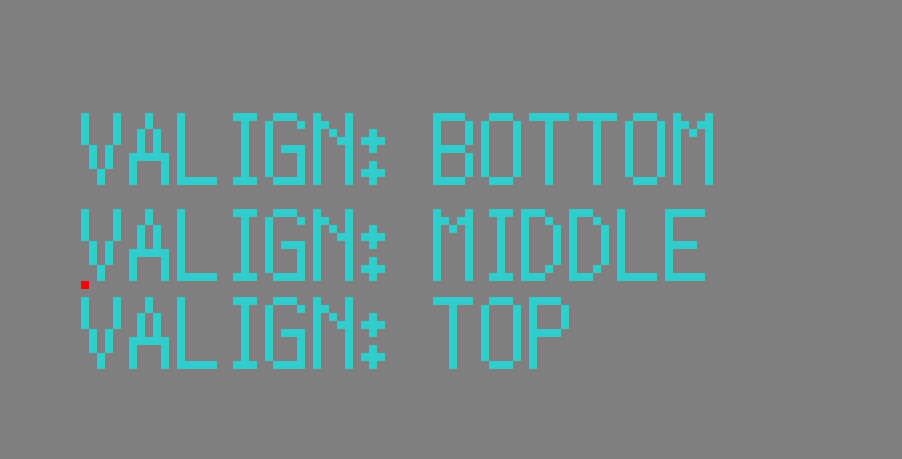
I have a solution that fixes this issue using the Scribble text rendering library, but wondering if there's any way to fix it for native GameMaker text rendering as well.  Anyone know if there is some way to change the font settings in GameMaker or a special import method so it doesn't do this?

For anyone else using Scribble this is my current fix, which aligns everything to the edges of the capitalized roman characters. Depending on how you're approaching localization, slightly different settings may make sense and you may want to swap these settings when changing languages. Note that this will only fix the issue when rendering text using Scribble functions not for any native text rendering.

scribble_font_set_halign_offset("fnt_silver",fa_center,1);
scribble_font_set_halign_offset("fnt_silver",fa_right,2);
scribble_font_set_halign_offset("fnt_silver",fa_left,0);
scribble_font_set_valign_offset("fnt_silver",fa_top,-2);
scribble_font_set_valign_offset("fnt_silver",fa_middle,1);
scribble_font_set_valign_offset("fnt_silver",fa_bottom,5);

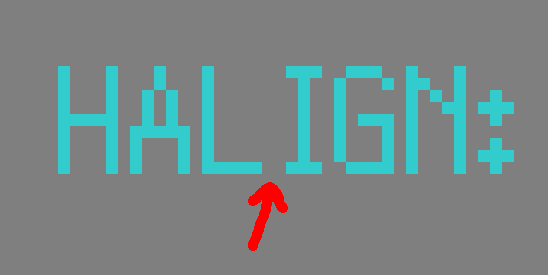
I've noticed some odd kerning for a few of the characters, the most obvious one being the capital "I" which has an extra pixel on its left side causing awkward gaps in some words. Image provided to show what I'm talking about.  There's also a similar issue with the exclamation mark and some other characters, but the "I" is the one that really stands out.
Just imported the new version. Seems to be working great! Thanks! 

(1 edit)

I'm having some trouble installing the newest version of GM Live into my current project. When I import via the marketplace. I get a whole bunch of error messages:
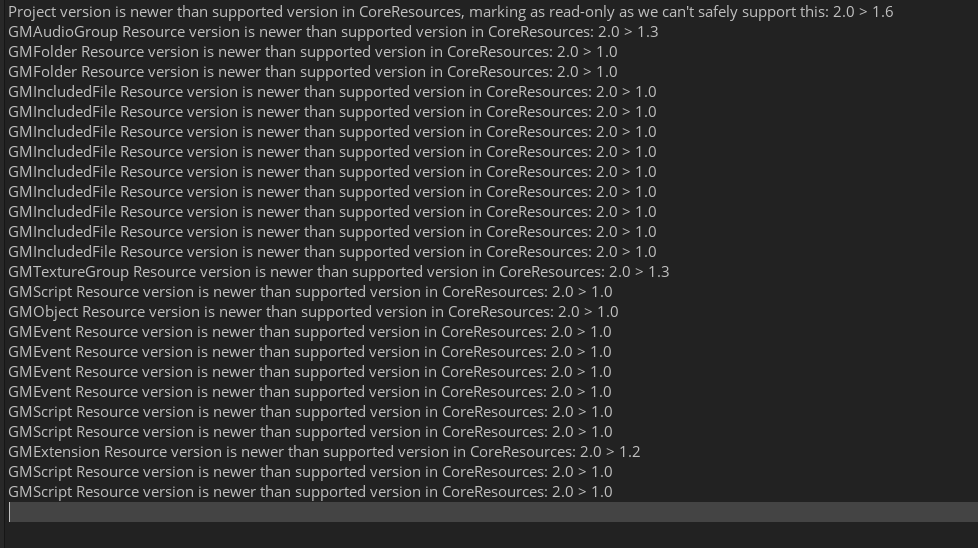
I also tried downloading the zip file for 2.3 from the marketplace to install it manually however it only had a live23.yyp file, no .yymp or .yymps files as described in the documentation. 

Is LTS 2022.0.1.31 just unsupported now or is something else going on?

Thanks!  

Good to hear you figured it out! It auto saves when you finish a level, but if you close the game mid-way without exiting the level first, it doesn't know to make a mid-level save.  Glad you're enjoying it! 

That would definitely be a difficult port! Apart from everything else the screen  on the playdate is very different than the full color 720p screen They Bleed Pixels was designed around. It is an intriguing little device though! 

Thanks! Great to  hear this version is running nicely on Steam Deck.

Gotcha. Unfortunately I'm going to have to decline. A lot of time and effort went into the art for this game and we don't want the artwork to be used as generic placeholder artwork representing other games like this. I would recommend searching itch for some art asset packs and using those to construct the generic snapshots for your game launcher. 

Hi Phil! 

  Could you explain how these snapshots will be used in a bit more detail? Will they be associated with Russian Subway Dogs within the launcher in some way? The example gallery doesn't really clarify this, as all the images are small cropped, unlabeled thumbnails and seem to be generic stock images of various sorts, not game screenshots. Feel free to shoot me an email at games at spookysquid dot com if you want to discuss further. Thanks! 

Great to hear the Linux version worked well for you. Always good to have confirmation for Linux since I was only able to test it on the machine I used to create the build. 

DRM free standalone versions are finally released! 
Sorry for the wait! Took far longer than originally planned.

DRM free standalone versions are finally released! 
Sorry for the wait! Took far longer than originally planned.

Thanks so much! It's always great to hear from folks who enjoyed the game :D 

Good news! I've got a stand alone build I've been testing that's looking like it's in a good place. Should be releasing later this month, assuming no major issues come up. Thanks for your patience!

Planning to release the DRM-Free standalone versions as soon as the console ports are done and the final update to the game is finished. There have been some setbacks recently but hoping to wrap stuff up soon! Apologies for the delay!