
On Sale: GamesAssetsToolsTabletopComics
Indie game storeFree gamesFun gamesHorror games
Game developmentAssetsComics
SalesBundles
Jobs
TagsGame Engines

YoYoK3nny

27
Posts
3
Topics
A member registered Feb 03, 2020

Recent community posts

The itch app keeps thinking the demo is an update to the full game.

Any chance you could make sure that the demo is uploaded before the full game?

My workaround at the moment is to skip the update when the demo is the only listed update (despite the full game already being fully updated)
(3 edits)

This has affected the game for ages though and has been addressed.

Game Page:

FAQs about errors and suggested fixes.

Q: Game’s screen is stuck in 640x480 resolution? No sounds are playing? No BGM is playing? A: Please reset _ResetRMsetting.reg , then run the game again.

The RPGMaker fullscreen option in the F1 settings applies to ALL RPGM games [in this case specifically, all RPG Maker VX Ace games], not just the currently launched game. (Hence why the default F1 hotkey is blocked)

(10 edits)

I know this is an old topic, but figured I’d add this here before it gets locked.


This isn’t that hard to accomplish.

Here’s how I do so:

  1. Create the main folder where the game will be (E.g: F:\itch.io\example)
  2. Create .itch folder where the receipt file will go (E.g: F:\itch.io\example\.itch)
  3. Create a minimal receipt file with the following contents, name it “receipt.json”:
    {
       "game": {
          "id": -1
       },
       "upload": {
          "id": -1
       }
    }
    
  4. Inspect the itch download page for the game and find the game id and the upload id.
  5. Edit the receipt file and replace the -1’s with the related id.
  6. Compress the receipt file using gzip to receipt.json.gz
  7. Install the game to the folder, keeping file/folder structure as it is in the archive.
  8. Scan installed games.

The game should now be listed in the installed games library.


When the game has an update:

  1. Find the new upload id for the update
  2. Extract the receipt file
  3. Change the upload id to the new id
  4. Compress the receipt file
  5. Install the update
  6. Scan installed games

In both processes, the app will update the receipt file with the missing details that match the game and upload ids.

(2 edits)

You'll have to find that for yourself.

I play on a Windows PC and have no need to emulate on a mobile device.

2 that I've heard about are:

Winlator

Box64Droid

At their core those 2 are the same thing, just different approaches (both use Wine on top of Box86 and Box64 to run Windows apps natively in Unix-based OS's such as Linux, Android, etc)

Use an emulator that uses Wine to handle the Windows API instead of JoiPlay. You'll have the added bonus of using the proper RPGM player (meaning no need for patches)

Hmm, weird...


And how are you installing the game? Itch app or manual download?


(The more details that can be forwarded on the better)

(2 edits)

Not encountering this at all.

Game version: 0.9.0.15

Palettes:

Default only

Mods:

Cheat Menu Framework AIO with latest changes


Are you completely deleting the old version from the folder everytime?

Old saves or fresh saves?

(2 edits)

Game version being used is also super important as there was that 1 version that was actually making everyone immortal. And the version before that one made everyone always have max willpower.

All sorted.

(1 edit)

This build doesn't show up as an option to either install or update in the itch app.

I did however work around this by installing the file that did show up, edited the file the app uses to identify the installed version so that it sees 0.1.5, deleted the files for 0.1 and manually installed 0.1.5

Reinstalling in the app worked as expected (reinstalled 0.1.5 and populated the missing data in receipt.json)

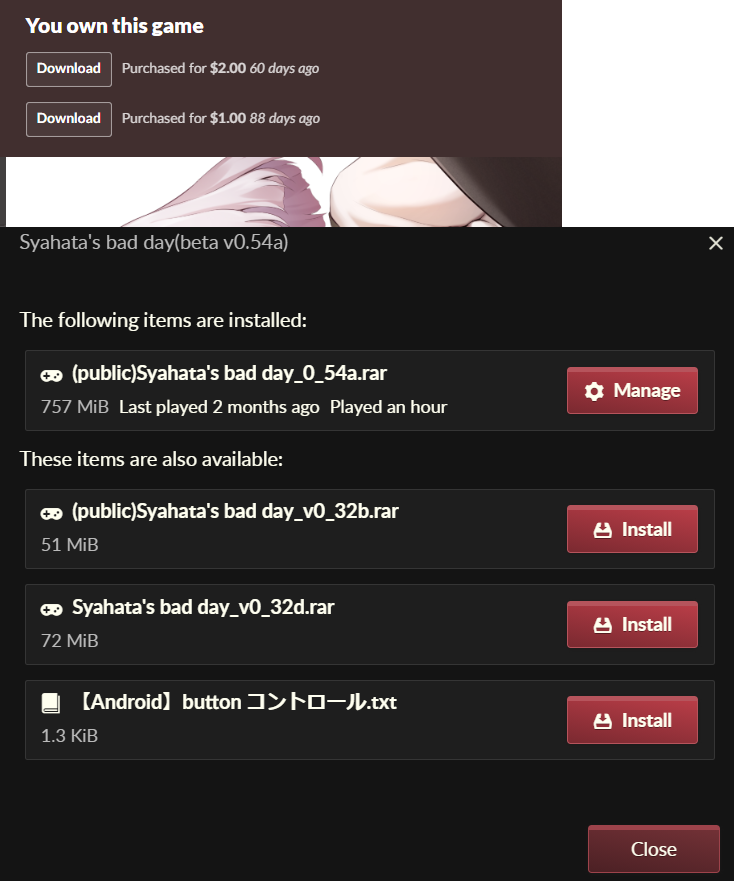
I've paid twice (once at $1.00, the second at $2.00) but the itch app is only showing files for the first payment ($1.00) 

Already provided feedback concerning the app, but is there anyway to get the first payment removed so that the files show for the higher amount?

I have replaced the installed files with the files from beta v0.54b manually, but of course the app currently won't see any updates for this game for me until the uploads for the $1.00 USD amount get updated.

Actually it's quite helpful if you plan to just stay there and grind for a while as the enemies respawn after a sleep. 

Getting the sword and the pitchfork before skipping is a good idea though either way.

And the initial quest can be skipped by leaving the sewers.

(2 edits)

For those looking for a regularly updated/tested to be working cheat mod, google "Modular Cheats Mod"

Should be the first result (quotation marks are required)

Side note: Until further notice, compatibility of the mod is not guaranteed if the mod is downloaded from anywhere other than F95. The current dev of the mod only posts it there at the moment. Last tested working against B.0.8.0.1

Go back to the screen with the Troll and find the other path.

The negative effects cheat was the one that usually caused this bug.

Saria's clothes have 3 states:

1. Intact

2. Tattered

3. Naked

Most of the time, enemies will only do enough to change from 1 to 2.

It all depends on how long it takes for enemies to get horny from seeing a partially clad Saria.

Keep in mind the game is designed for a resolution of 1920x1080. That's a lot of graphics for JoiPlay to deal with along with emulating the engine.

Take a look at the additional notes in the minimum requirements, 1920x1080 is highly suggested because the game is designed for that resolution. Anything smaller becomes hard to read.

The stretch option is also on by default because on lower resolutions you would only see a portion of the viewpoint.

Maybe once the game reaches v1.0 there could be resolution options, but that would also be a lot of work as the graphics and UI resolutions would need to be separated to overcome this issue. (If that's even possible with RPG Maker)

Best workaround is to have a screen with a native resolution of 1920x1080 (or a TV with 1080p)

(1 edit)

I still have the download of the old demo if Eccma wants it, just need to know where to send it.

Of course, if the demo really is on its way out then no worries.

Disregard this message.

Hi,

I just finished adding translation support to the Cheats Mod that I took over a while ago, and have discovered a minor bug with the Window_Base class.

The new_line_x function is missing.

It's not normally an issue without the mod, so I have included the fix in the mod itself.

All I did to fix it was copy the function from the Window_Help class.

Game version: B.0.7.7.0

UniqueEvent_CoconaVag still crashes in RECroom, needs Cocona_Will stat.

Pretty sure it's a side effect of her being a companion (even if that status is specific to quests)

(1 edit)

Thank you, this fixed it, I cannot reproduce the crash no matter what I do with this fix in place.

EDIT: The prev_stable version also suffers this issue, but the fix also works there.

After reading all unread notes, clicking out into the main section of the pause menu once the "Unread Letters" section is empty crashes the game: (doesn't matter which mouse button is used)

Here follows a summary of the error log: (full log here)

◆ 2023-01-23T18:18:32

■ Error Type :

  NoMethodError

■ Message :

  undefined method `visible=' for nil:NilClass

■ Backtrace :

  (eval):251:in `quit_read_mail'

  (eval):397:in `mouse_press_cancel'

  (eval):360:in `main_menu_mouse_press_cancel'

  (eval):154:in `mouse_input'

  (eval):127:in `update_input'